


In a memo dated 22 December 2025, the Federal Ministry of Finance specified how the all-inclusive price for combined offers (food and beverages) is to be divided.
- In the case of combined offers with food and beverages, it is to consider the beverage portion at a flat rate of 30% of the total price
- The remaining 70% is deemed to be the price of the food and is subject to the reduced tax rate of 7%
Example:
a) Item Wedding arrangement
b) Item beverage share of 30 % and a VAT rate of 19 %
c) Item food share of 70% and a VAT rate of 7%
We recommend the following procedure for implementation in Bp Event:
Create three items
- Wedding arrangement
Create a combo item and then assign the components per VAT rate and a subtotal to this item.
Note: Assign an item group that allows for components. - Wedding arrangement food
Create another item for the meals, enter a price and the correct VAT rate (7%) for each price group. - Wedding arrangement beverages
Create another item for the beverages, enter a price and the correct VAT rate (19%) for each price group.
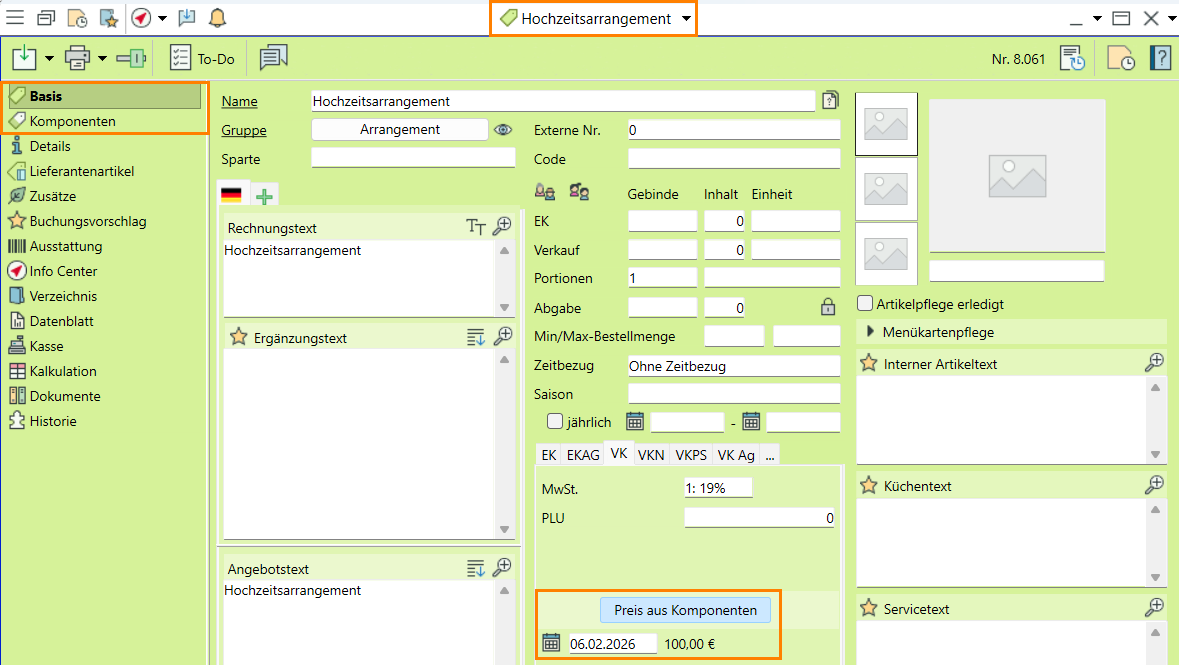
Read more about the topic Creating items.
Assign the components
The components b) wedding arrangement food and c) wedding arrangement beverages are stored in the item a) wedding arrangement. This item is set to be automatically expanded on booking, using the prices from components.
- Open item a) Wedding arrangement.
- Switch from the
 General tab to the
  Components tab.
 - Open the item search by clicking on
 New and add b) Wedding arrangement food and c) Wedding arrangement beverages as components.
 - Enter "1" for each count.
- Check the price and enter a different price per component if necessary.
-
 Add a
Add a  Subtotal .
 - Select the Always expand option as Expand default in the line at the top of the input window.
- In item a) Wedding arrangement, switch back to the General tab and activate the field Price from components.
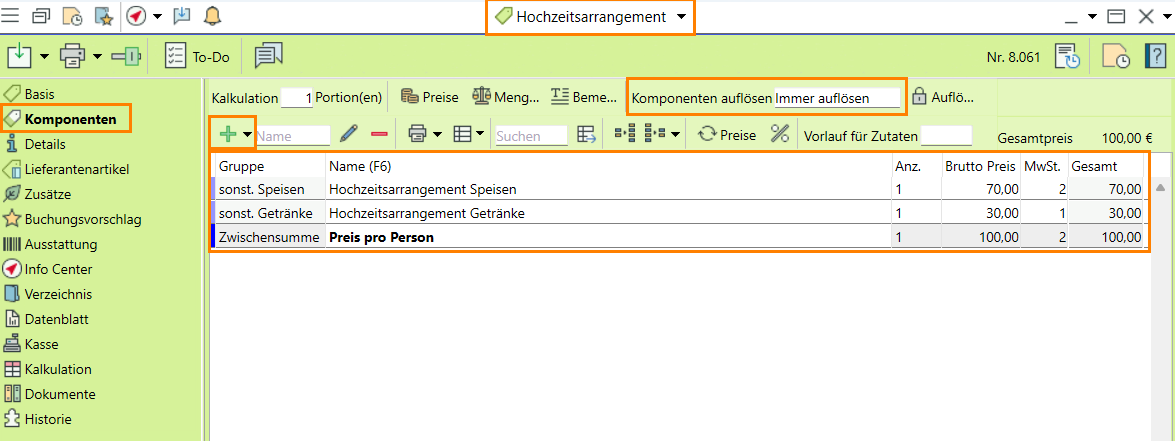
Read more about on Adding components
Book and edit arrangement in the segment
- In the event, book the item a) Wedding arrangement in the corresponding segment.
- The booked item is expanded to its components without any further enquiry.
b) Wedding arrangement meals with the 7% VAT rate
c) Wedding arrangement beverages with the 19% VAT rate
is expanded. The subtotal from the components is also inserted. - If necessary, change the price of the individual components or enter a different price in the subtotal.
Note: The simple Subtotal allows you to enter a different unit price and adjusts all higher item prices as a percentage.
Event-specific items allow for individual customer requests.
Read more on Event-specific items
Administrator Manual


- VAT reduction for foods in 2026
- 3. Create a new item group package and assign all affected item groups
- 2. Import the scenario from the object catalogue
- 1. Update to the latest version
- 4. Check and complete the country settings
- 5. Start a job to convert the VAT rates
- 6. Maintain VAT suggestions
- 7. Check the necessary conversions for your database
- 8. Enter a storage rule (optional)
- 9. Activate the monitoring job for creating new item groups (optional)
- 10. Check your revenue accounts
- 11. Adjust item prices (optional)
- 12. Update your menu cards (optional)
- Implement 70/30 rule for item package deals (package deal, combined offer)