12.2C13
E-invoice: new icon, conversion level and warning notice
Send e-invoices even more easily and securely with new mark for the correct spreadsheet template and a warning if an unsuitable template is selected.
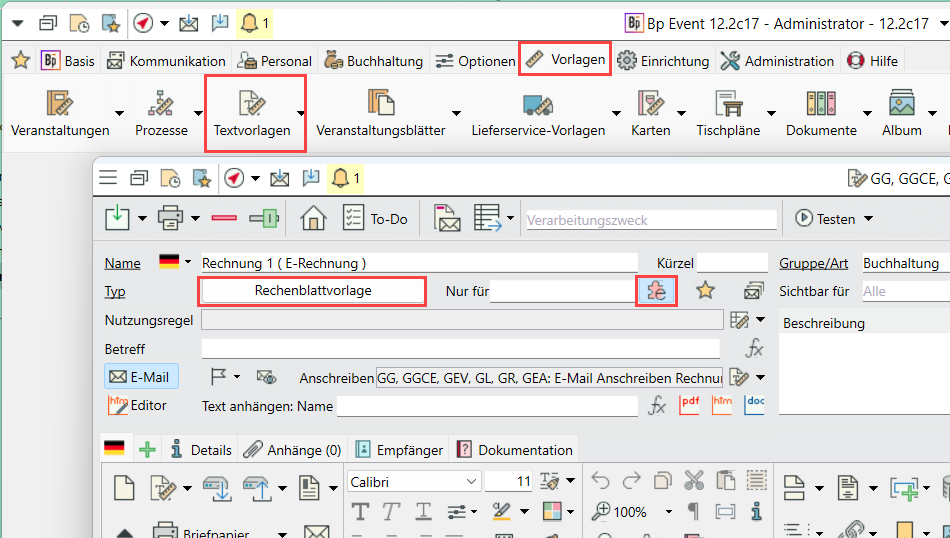
1) Text templates of the spreadsheet template type have a new "e-invoice" property with a clearly recognisable icon. The spreadsheet templates that are suitable for e-invoices (whose content is in line with the invoice XML) are thus easily recognisable.
2) Conversion stage: When the version is imported, the text templates of the spreadsheet template type that contain at least one of two added fields are automatically marked as "e-invoice":
Invoice recipient with UUID 30659C7938BBEE49A363DD19E7A2738B
or invoice issued by with UUID DB4B8DC10065844785CA375AEB93FA5F
These were used in e-invoice templates in the past. This means that most customers who already have e-invoice templates should have the mark from 1) set correctly.
3) If an invoice has a recipient with e-invoice active, only templates with this mark will be offered. A warning is issued if it is an e-invoice recipient but the template is not an e-invoice template.
Warnings are issued for jobs or bulk operations on lists (e.g. "Generate invoice") or the warning is displayed in the job log. If a user decides in favour of a non-e-invoice template, the decision is noted in the change log.
E-invoice templates can also be used for invoice recipients without an e-invoice setting, but not the other way around.